 kayetana
Your models, your choice.
kayetana works with open models that run right on your server. You see what's installed, add new models, and decide which model handles which task.
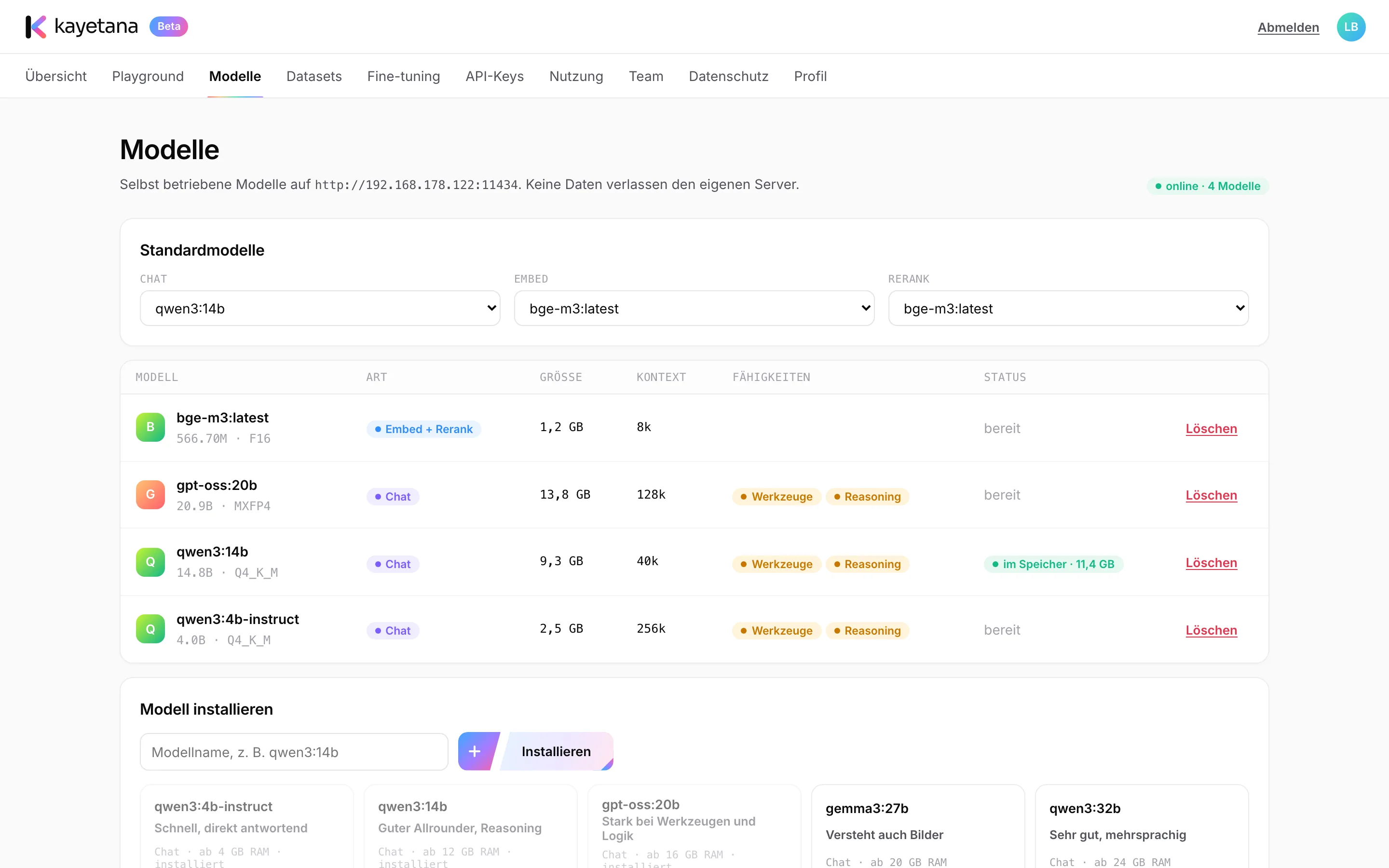
Everything that matters on one page.
For every installed model, you see its size, context length and capabilities. At the top, you set the default models for chat, embed and rerank. Below, you install new models by name or delete the ones you no longer need.
- Size, context length and capabilities
- Default model for chat, embed and rerank
- Install and delete with one click
These models come with it from day one.
| Model | Task |
|---|---|
| qwen3:4b-instruct | Chat, base for your own fine-tuning |
| qwen3:14b | Chat and reasoning |
| gpt-oss:20b | Chat and reasoning |
| bge-m3 | Search, reranking and classification |
| Whisper large-v3-turbo | Speech transcription |
All included models are openly licensed (Apache 2.0 or MIT).
What's in it for you.
Runs on your hardware
The models live on your server. No prompt ever goes to a cloud service.
Plenty of choice
Add more open models by name from the Ollama library.
Your own variants
Fine-tuning creates your own models, listed right next to the included ones.
How to add another model.
Enter the name
Type the name from the Ollama library, for example a larger chat model.
Install
kayetana downloads the model to your server. This needs internet once.
Make it the default
If it works for you, set it as the default model for its task.
How much model fits on your machine.
Model size depends on your Mac Studio's memory.
- Recommended: 36 GB of memory or more
- Runs models up to about 20B parameters
- With search and transcription running alongside
- More memory allows larger models
Find the right models for your team.
We'll help you choose the models and the memory that fit your tasks.
Frequently asked questions
Can I use models other than the included ones?
Yes. Add more open models by name from the Ollama library. How large they can be depends on your Mac Studio's memory.
What does default model mean?
For chat, embed and rerank, you choose which model is used when a request doesn't name one.
Do I need internet for new models?
Only to download them. After that, the model runs on your server without internet.
What licenses do the models use?
The included models are licensed under Apache 2.0 or MIT. Models you add come with their own licenses.