 kayetana
AI you can run. Not just use.
Shadow AI on personal accounts is hard to control. kayetana gives your company a platform on your own network, with roles, keys, limits and logs, that you run yourself.
Built to run on your own network.
HTTPS with your own certificate
Caddy in front, and the app only listens locally.
Nightly backups
Database and files at 3:15 a.m., kept for 14 days.
Works offline
Internet only to load models and updates.
Roles and sign-in
Owner, Admin, Member. 15-minute lockout after 10 failed attempts.
API keys with limits
Bearer authentication, a monthly limit per key, 429 when exceeded.
Updates by script
Services restart on their own after a reboot.
Stay on top of your models.
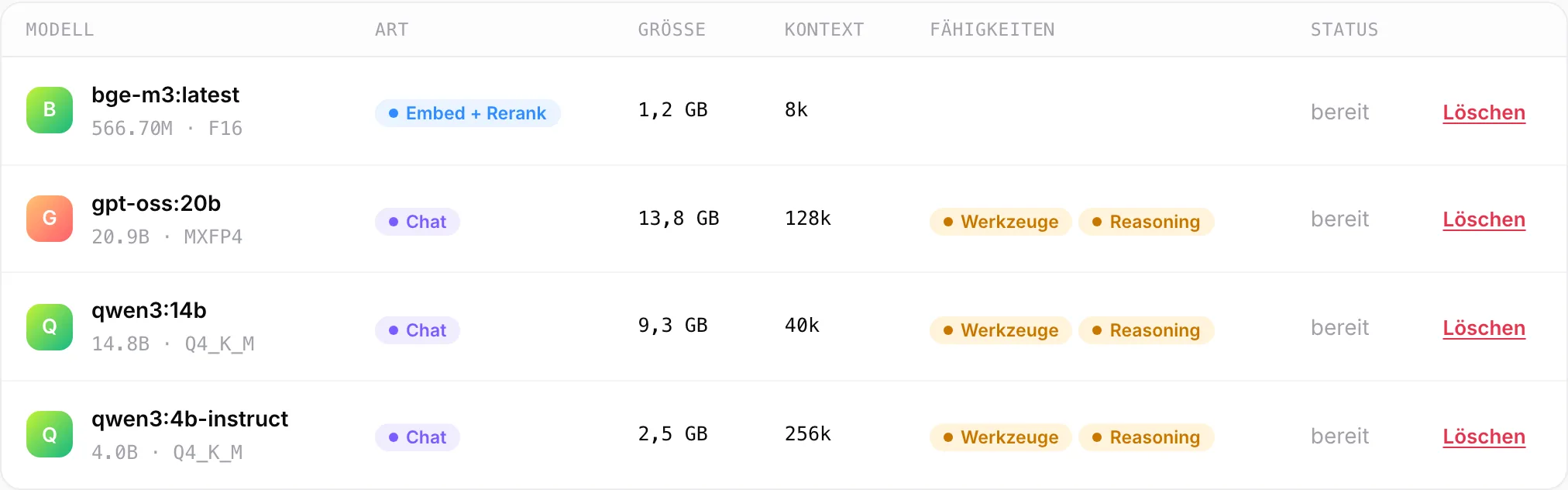
See every installed model with its size, context length and capabilities. Pull new ones by name from the Ollama library, remove old ones and set the default model for chat, embed and rerank.
- Open models (Apache 2.0 or MIT)
- Default model per task
- More memory means larger models
What you need.
kayetana runs on a Mac Studio with Apple silicon. We recommend 36 GB of memory or more so models up to about 20 billion parameters can run alongside search and transcription.
- Mac Studio with Apple silicon
- 36 GB of memory or more recommended
- Power and a network connection
- Internet only for models and updates
- An additional external backup is recommended
- Your own hardware or supplied by us
From box to service.
Set up and connect
Put the Mac Studio on your network.
Install
One script sets up models, services, HTTPS and backups.
Grant access
Invite the team by link, create roles and API keys.
Take a closer look at operations.
In the demo, we walk you through setup, models, keys and the usage log.
Frequently asked questions
What services run on the server?
Ollama for the models, a helper service for transcription, tokenization, document parsing and fine-tuning, plus the app behind Caddy with HTTPS.
How are backups handled?
Every night at 3:15 a.m., kayetana backs up its database and files and keeps the backups for 14 days. We recommend an additional external backup.
How is sign-in protected?
Sessions last 14 days. After 10 failed attempts, sign-in is locked for 15 minutes. Admins create password reset links.
How do I update kayetana?
With a script. Services restart on their own after a reboot.