 kayetana
Chat, test, share presets.
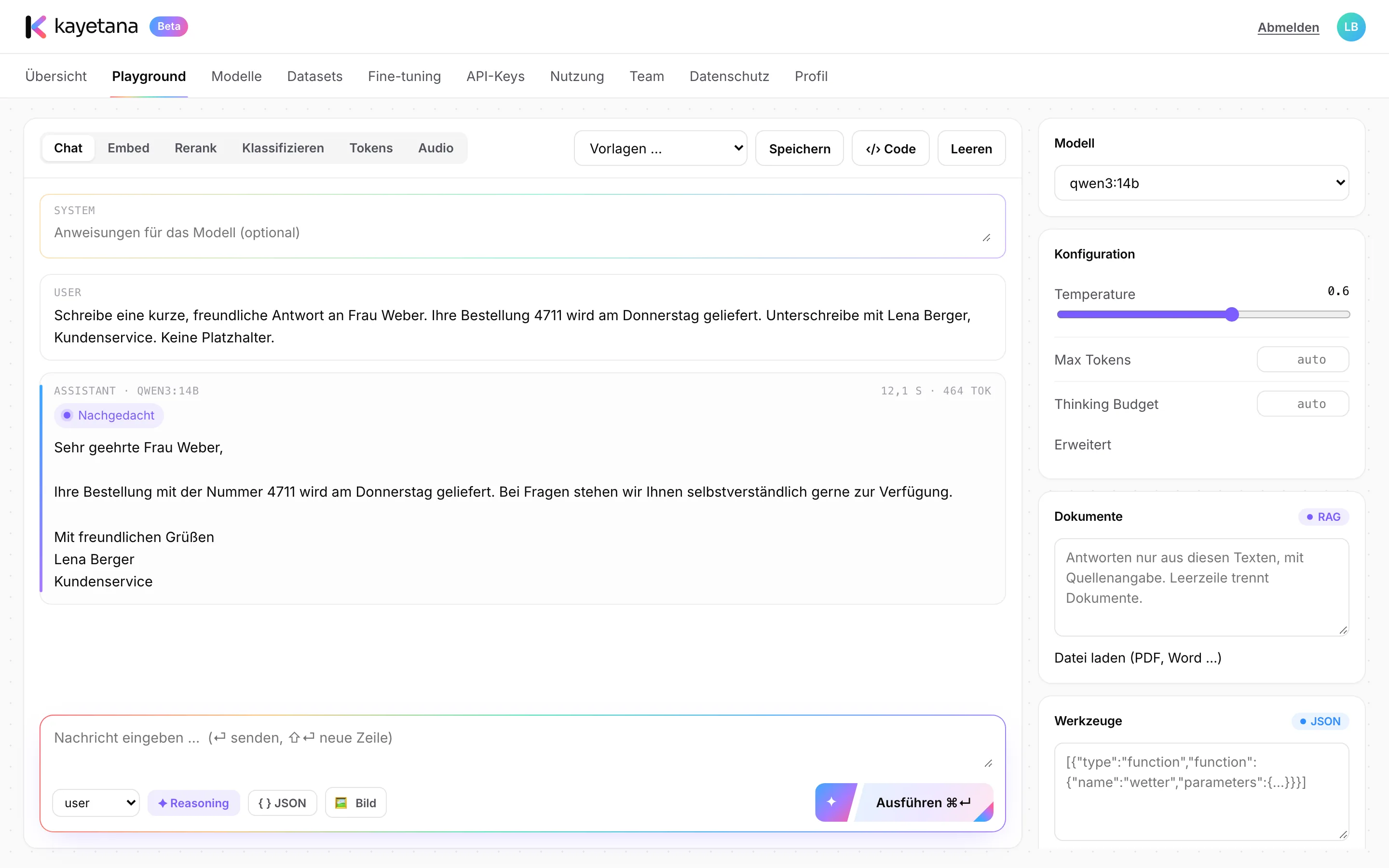
The Playground is where your team works with AI and tries out new ideas. You decide how the model should answer, and the matching code comes with it.
A model tuned exactly the way you need it.
Write a system instruction like “Keep it short and friendly, in the voice of our support team,” then ask your question. Temperature and max tokens are right there in the sidebar. You can pick a different model for every request.
- System instructions for tone and role
- Adjustable temperature and max tokens
- Choose the model per request
Much more than a text box.
Reasoning
Let the model think before it answers, with a budget you control. Useful for calculations and trade-offs.
JSON mode
The model replies in JSON, so you can drop results straight into spreadsheets or other systems.
Image input
With vision-capable models, ask questions about a photo or screenshot directly.
Tools
Use function calling to describe functions the model can call, like an inventory lookup.
Team presets
Save settings that work as a preset. Your team can use them with one click.
Sample code
For every request, the Playground shows working code in Python, TypeScript and curl.
From first draft to team preset.
Write the instruction
Decide how answers should sound, for example when customers ask about delivery dates.
Test with real cases
Try a few typical customer questions and fine-tune the temperature and instruction.
Save it as a preset
Store the final setup as a preset for the whole team.
Move it into your app
Click “Code” and copy the matching call in Python, TypeScript or curl.
What teams use chat for.
- Drafting replies to customer emails
- Summarizing long emails and reports
- Drafting boilerplate for proposals
- Turning meeting notes into action items
- Pulling structured data out of free text as JSON
- Answering questions about screenshots and photos
Try the Playground with your own questions.
In a demo, we'll show you how your team works with chat, presets and sample code.
Frequently asked questions
Which models can I chat with?
qwen3:4b-instruct, qwen3:14b and gpt-oss:20b come included. You can add more open models by name from the Ollama library.
Are my chats stored?
kayetana doesn't store prompts or answers. It only logs the time, endpoint, model, status, tokens and duration.
What does reasoning do?
The model thinks before it answers, which helps with multi-step tasks. The budget caps how much effort it spends. You can also turn reasoning off.
Can I upload images?
Yes, with vision-capable models. The model list shows what each model can do.
How do I get from the Playground to my own app?
Click “Code” and the Playground shows the current request in Python, TypeScript or curl. Add an API key and it runs from your app.