 kayetana
In your office or in a data center?
A rented GPU server brings lots of compute, but it sits somewhere else. A Mac Studio sits with you, quiet and smaller than a shoebox.
Owning hardware versus renting.
| Mac Studio in your office | Rented GPU server | |
|---|---|---|
| Where data lives | Your office, your network | The host's data center |
| Works offline | ✓ | – |
| Access | On your own network | Over the internet |
| Very large models | Up to the Mac Studio's memory | Bigger GPUs available to rent |
| Cost | Hardware once, flat platform fee | Ongoing rent |
| Hardware failure | Your job, nightly backups | Handled by the host |
| Space and noise | Quiet, fits on a desk | No office space needed |
| Setup | Script for models, HTTPS, backups | Depends on the offer |
Rental offers vary a lot. This column describes the typical model, not any specific provider.
One Mac Studio is enough for your team.
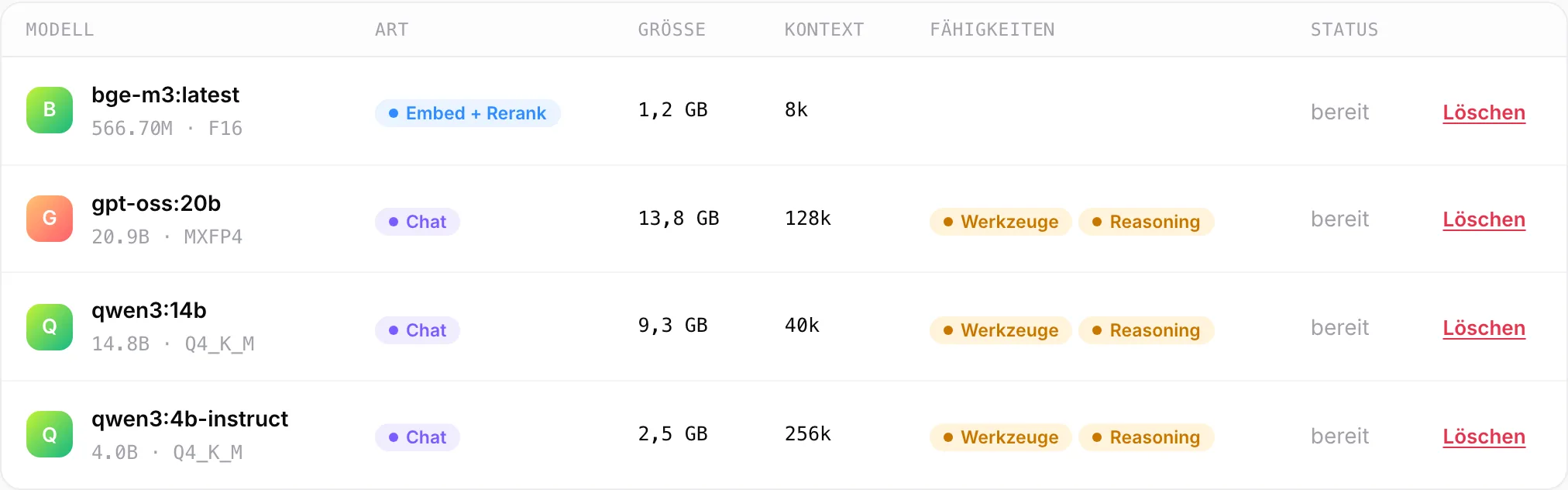
We recommend a Mac Studio with 36 GB of memory or more. That runs models up to about 20 billion parameters alongside search and transcription. More memory fits larger models.
- qwen3:4b-instruct, qwen3:14b and gpt-oss:20b for chat and reasoning
- bge-m3 for search, rerank and classification
- Whisper large-v3-turbo for speech
What speaks for each side.
Mac Studio: location
The hardware sits in your office. Data never leaves the building.
Mac Studio: offline
Once the models are loaded, it runs without the internet.
Mac Studio: no rent
You buy the hardware once instead of paying rent every month.
Renting: large models
Big GPUs run models that need more memory than a Mac Studio has.
Renting: no hardware
The host takes care of failures and replacements.
Renting: from anywhere
A server in a data center can be reached over the internet.
Which hardware fits you?
We'll help you pick the right Mac Studio and show you kayetana in a demo.
Frequently asked questions
Which Mac Studio do I need?
We recommend 36 GB of memory or more. That runs models up to about 20 billion parameters alongside search and transcription. More memory allows larger models.
Does kayetana run on a rented server too?
kayetana is built for a Mac Studio with Apple silicon on your own network. Talk to us if you have a different environment in mind.
What happens if the Mac Studio fails?
kayetana backs up the database and files every night at 3:15 a.m. and keeps the backups for 14 days. We also recommend an external backup.
Do I have to take care of updates?
You install updates with a script. After a reboot, all services start on their own.